


Exploring the Modern Land Rover Defender Interior
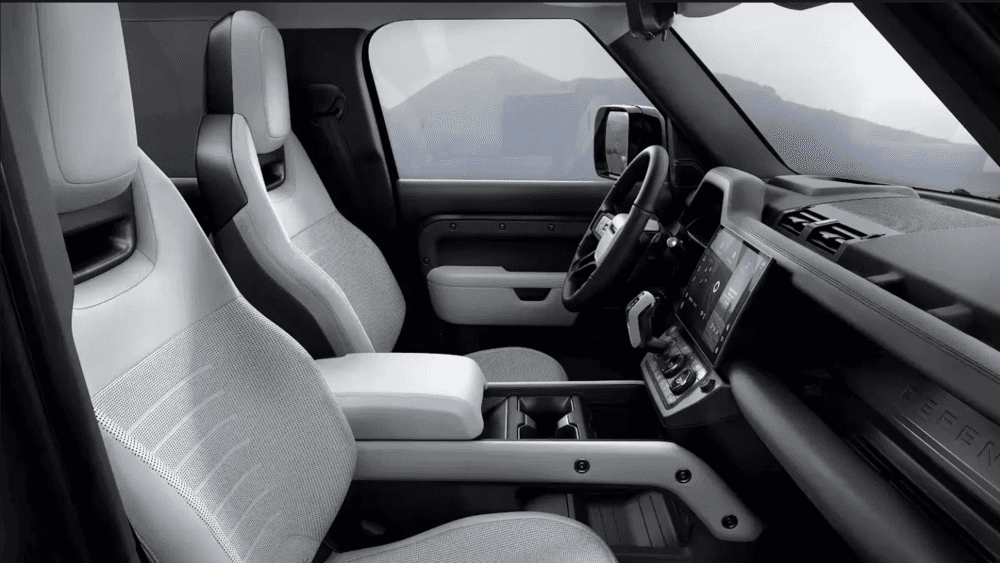
Photo Source/Copyright: Land Rover USA
Most SUVs that look this rugged from the curb ask you to make a sacrifice once you step inside, usually in the form of cheap plastics, clunky ergonomics, or exposed bolt heads where a proper trim panel ought to be. The Land Rover Defender interior takes a deliberate left turn: it keeps the structural elements visible on purpose, then coats everything you actually handle in top-tier materials. A powder-coated magnesium cross-beam spans the dash, while supple Windsor leather covers the seating. On paper, it sounds like a contradiction; behind the wheel, it feels like absolute confidence.
The 13.1-Inch Display Upgrade
Land Rover eliminated the old screen split, where entry trims got a 10-inch display and higher versions received an 11.4-inch unit. Now, every single trim level and wheelbase standardizes a 13.1-inch curved glass panel pulled directly from the Range Rover line, fundamentally modernizing dashboard ergonomics.
- Haptic Feedback: Physical click responses ensure you don’t need to look away from the road to confirm touch inputs.
- Pivi Pro Architecture: Built on a swift “two-tap” menu structure to keep critical controls within immediate reach.
- Reconfigured Console: Moving the shifter closer to the driver freed up deep storage bins that easily swallow a phone and wallet together.
Wheelbase Options, Seating, and Cargo Space
Choosing a Defender comes down to how many passengers and how much gear you plan to move. A front-row center jump seat remains optional on the two shorter variants, a quirky feature almost nobody else in the luxury segment offers.
| Variant | Seating Capacity | Cargo Behind 3rd Row | Cargo Behind 2nd Row | Max Cargo Volume |
|---|---|---|---|---|
| Defender 90 | 5 (6 with jump seat) | N/A | 15.6 cu. ft. | 58.3 cu. ft. |
| Defender 110 | 5, 6, or 7 passengers | Minimal (3-row option) | 34.0 cu. ft. | 78.8 cu. ft. |
| Defender 130 | 8 passengers across 3 rows | 15.3 cu. ft. | 35.8 cu. ft. | 76.1 cu. ft. |
Standard Equipment vs. Premium Upgrades
Unlike rivals that hide essential tech behind expensive option packs, every Defender starts with high-end features.
- Standard Features: 13.1-inch Pivi Pro screen, 12.3-inch Interactive Driver Display, Wireless Apple CarPlay/Android Auto, wireless charging with signal booster, heated front seats with memory, dual-zone climate, and 3D Surround Camera with ClearSight Ground View.
- Available Upgrades: 14-speaker Meridian Surround Sound, SUBPAC Body & Soul audio seats, front console refrigerator compartment, Head-Up Display, ClearSight rear-view mirror, sliding panoramic roof, and adaptive off-road cruise control.
Built for Utility and Hose-Out Convenience
If you select the rubber floor options, the interior trades Range Rover fluff for unpretentious utility. Floor cutouts feature built-in drainage plugs, and surfaces are wrapped in wipe-down, scuff-resistant materials. You can load up muddy gear from a trailhead, spray down the footwells, and drive straight to dinner without a second thought.
The 90 variant trades away cargo depth for agile proportions, while the 110’s third row is best reserved for kids. If you want uncompromising space for adults and luggage alike, the 130 is the natural fit. We keep a mix of wheelbases on the ground so you can compare a 90 and a 130 back-to-back in one afternoon. Book a test drive or stop by to see how the cabin feels in person.
More From Land Rover Akron
How to Change a Battery on Any Vehicle
Photo Source/Copyright: Land Rover USA You turn the key and get that slow, sagging crank; the sound of a car battery giving up. Nine times out of ten, that sagging groan means your battery has run its course. Swapping out a battery in your own driveway takes about an hour, two simple hand tools,…
What Does It Mean When Cars Stall?
Photo Source/Copyright: JD Power There’s a specific, sickening half-second where your brain catches up to what just happened. The radio is still playing, the dashboard lights are illuminated, but the gas pedal feels dead under your foot. You aren’t accelerating anymore; you’re just coasting on momentum you didn’t ask for while surrounding traffic…
Why Your Brake Warning Light Is On
Photo Source/Copyright: RepairPal What should you do the moment that unexpected dashboard illumination catches your eye while traveling down the highway? A brake alert is one of the few dashboard warnings that deserves an immediate response. When the brake warning light is on, the color of the alert tells you how much time…